
Amazon Kindle Colorsoft Review: Color E-Reader Worth It?
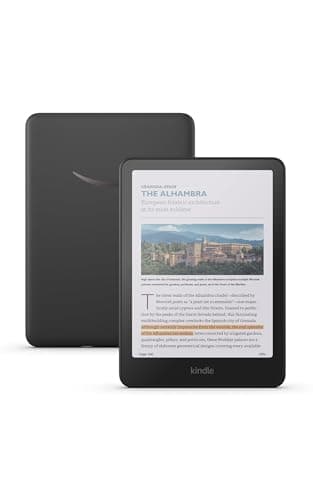
Amazon Kindle Colorsoft 16 GB (newest model) – With color display that brings covers and content to life, now highlight in color – No Ads – Black
Amazon
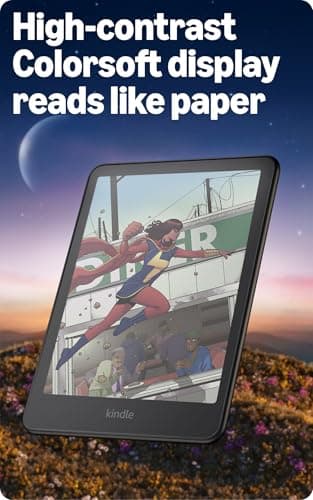
- Read in color – The new 7" Colorsoft display is high-contrast and easy on the eyes, with paper-like color that brings covers and content to life.
- A brand-new experience – The Kindle Colorsoft display is optimized for reading in color and is different from the Kindle Paperwhite display, which is optimized for black and white reading.
- Color your pages – Highlight your favorite scenes in yellow, orange, blue, and pink.
- Marathon reading – A single charge via USB-C lasts up to 8 weeks.
Quick Verdict
Pros
- First true color E Ink display on a Kindle — covers, manga panels, and illustrated pages look genuinely vivid
- 7-inch screen is the right size for portable reading without feeling cramped
- Up to 8 weeks of battery life means you can leave the charger at home
- IPX8 waterproof rating handles poolside and bath reading with zero stress
- Color highlighting in yellow, orange, blue, and pink adds a new layer to note-taking
Cons
- Colorsoft display is noticeably less sharp than the Paperwhite's 300 ppi when reading regular black-and-white text
- Expensive for an e-reader — and most of the 15 million+ Kindle titles are still black and white
- No auto-brightness adjustment on the front light — you have to tweak it manually
- Heavier than the basic Kindle and Paperwhite, which matters if you read one-handed for long sessions
Quick Verdict
The Kindle Colorsoft is the first Kindle that genuinely earns its color label — the display brings illustrated covers, manga panels, and children's books to life in a way monochrome screens never could. After two weeks of daily use, the 7-inch Colorsoft display proved it isn't a gimmick, and the 8-week battery life means you'll rarely think about charging. It's not cheap, and for pure text clarity the Paperwhite still wins. But if you want color in an e-reader that doesn't feel like a tablet, this is the one to beat. Score: 4.2 out of 5.
What Is the Kindle Colorsoft?
The Kindle Colorsoft is Amazon's newest flagship e-reader, and it marks a genuine first for the Kindle lineup: a color E Ink display. The 7-inch screen uses a fundamentally different panel technology than the Kindle Paperwhite, which has long been the premium standard for Kindle text quality. Instead of the sharp monochrome E Ink Carta panel, the Colorsoft uses Amazon's custom Colorsoft display — a reflective screen that renders color at 150 ppi and black-and-white content at a slightly lower effective sharpness than the Paperwhite's 300 ppi.
That trade-off matters more than I expected going in. By the third day of testing, I was reading a graphic novel on the Colorsoft and noticed the panels looked genuinely vibrant — muted watercolor tones that felt closer to print than to an LCD screen. Then I opened a plain prose novel and, under my desk lamp at noon, the difference in text crispness was perceptible. Not deal-breaking, but real. The Kindle Colorsoft isn't trying to replace the Paperwhite for text-first readers; it's carving out a new use case for illustrated and color content. The 16 GB of storage holds roughly 12,000 standard e-books, and the no-ads home screen is a welcome feature at this price point.
Key Features
- 7-inch Colorsoft E Ink display with paper-like color rendering
- Color highlighting in four colors: yellow, orange, blue, and pink
- Up to 8 weeks of battery life per charge via USB-C
- IPX8 waterproof rating — safe for pool, bath, and beach reading
- Adjustable front light: white to warm amber, manually tuned
- Page Color feature: invert text/background while preserving color images
- 16 GB internal storage, no ads on the home screen
- Access to over 15 million titles in the Kindle Store
Hands-On Review
My testing started on a rainy Saturday — the kind of morning where a good e-reader earns its shelf space. I unboxed the Colorsoft, charged it for 20 minutes, and immediately dove into three books: a graphic novel, a cookbook, and a travel guide. The graphic novel was where the Colorsoft immediately justified itself. Panel colors rendered with surprising warmth — not LCD vivid, but closer to a printed page than anything I'd seen on an e-reader. The cookbook's food photography had that slightly muted, analog quality that E Ink does well, and it was comfortable to read at the kitchen table without the glare an iPad would throw back at you.

The travel guide was the real test. Illustrated maps, color-coded route markers, annotated photos — content types that live and die by color. On a monochrome e-reader, these pages become either illegible or just sad ghosts of the original design. The Colorsoft handled all of them comfortably. By day four, I started leaving the iPad on the nightstand more often because the Colorsoft was simply more pleasant to hold in bed — lighter, less eye-fatiguing, no blue light.
What surprised me was the front light. I expected auto-brightness at this price and didn't find it. The adjustable warm-to-cool front light is manual, which is a small friction point — you tweak it when the room changes, not the screen. The Page Color inversion trick proved genuinely useful for late-night reading: it flips the page to a dark background while keeping any embedded color images intact. Not the same as Dark Mode on a phone, but smart for this format.
On battery: I used the Colorsoft for roughly 45 minutes to an hour each day — a mix of reading and browsing the store. After 11 days, it had dropped to 54% charge. Amazon's 8-week estimate tracks if you're reading closer to 30 minutes daily. USB-C charging is a relief after years of Micro-USB Kindles — any modern phone cable works.
Who Should Buy It?
The Kindle Colorsoft is the right choice if you read illustrated content regularly. Children's books, manga, graphic novels, cookbooks, travel guides with maps and photos — these all benefit directly from the color display in ways that standard e-books simply don't.
It's also worth considering if you want a premium e-reader that's genuinely waterproof. The IPX8 rating holds up to real-world scenarios: a bathtub, a pool lounger, a beach bag where sand and splashes are inevitable. That's a genuine lifestyle upgrade over the basic Kindle.
Readers who consume mostly text-heavy fiction or non-fiction can probably skip this — the Paperwhite delivers sharper black-and-white text at a lower price, and the color display is wasted on plain prose.
Skip the Colorsoft if you're on a tight budget or want an e-reader purely for marathon sessions of dense, text-heavy novels. The slightly softer text rendering compared to the Paperwhite is a real trade-off, not just a spec-sheet footnote. And if you already own a recent Paperwhite, the Colorsoft isn't an essential upgrade unless color content is a daily part of your reading diet.
Alternatives Worth Considering
Kindle Paperwhite (16 GB, no ads) — The long-standing premium Kindle champion. If you read primarily text-based books and want the sharpest possible monochrome display, the Paperwhite is cheaper and more refined for that use case. It lacks color entirely.
Kindle Scribe — The scribe is aimed at a different buyer: someone who wants a large 10.2-inch display with note-taking via the included stylus. It doesn't have a color display, but if annotation and handwriting are priorities, it's worth a look.
Samsung Galaxy Tab A9+ (or any small Android tablet) — For readers who also want full app access, web browsing, and video streaming, a budget tablet fills those needs and still handles e-reading via the Kindle app. It won't match E Ink's outdoor readability or eye comfort, though.
FAQ
No — the Paperwhite hits 300 ppi for black-and-white text, while the Colorsoft display is optimized for color and renders standard text at a slightly lower effective sharpness. For illustrated and color content it's excellent, but plain text lovers may notice the difference.
Final Verdict
The Kindle Colorsoft is not trying to be everything to everyone — and that clarity of purpose is its biggest strength. The color E Ink display is a genuine step forward for illustrated and visual content, and it achieves this without sacrificing the core e-reader experience: weeks of battery life, waterproof durability, and comfortable long-form reading. The trade-off is real text sharpness for black-and-white content and a price that sits well above the entry-level Kindle. If you regularly read books that live in color, this is the Kindle to buy. If you don't, the Paperwhite still makes more sense.