
Kindle Scribe Review: The Best E-Reader for Notes?
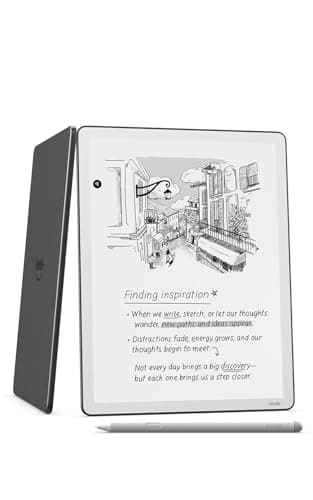
Amazon Kindle Scribe 32GB (newest model) — 11” paper-like display with front light — Thinner, lighter, faster — Write in notebooks, documents, and books. Includes Premium Pen - Graphite
Amazon
- All-new Kindle Scribe – Features an 11” glare-free display with front light, built-in notebook, AI tools, and support for popular cloud services.
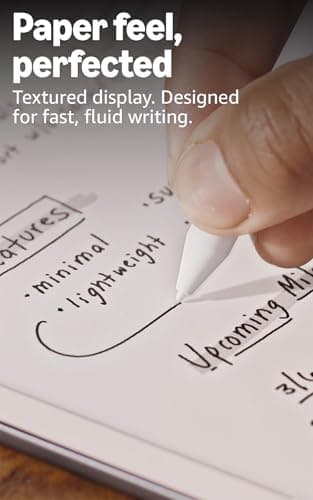
- Feels just like paper – Textured surface and ultra-fast responsiveness for a natural writing experience. Included Premium Pen requires no charging.
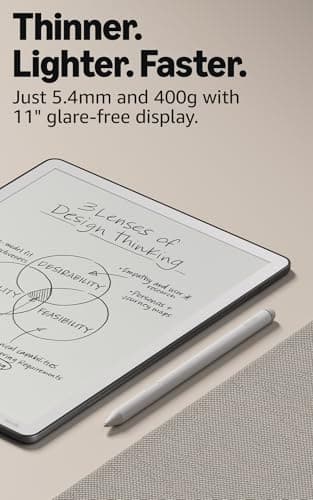
- Thinner, lighter, faster – At just 5.4mm thin and 400g light, it's redesigned for comfort, with a larger 11” display, and 40% faster writing and page turns.
- Just right in any light – The display automatically adapts brightness to your lighting conditions. Adjust the warmth for greater comfort at night.
Quick Verdict
Pros
- 11" paper-like display with front light and automatic brightness adjustment
- Premium Pen requires no charging and has ultra-fast responsiveness
- Active Canvas automatically expands space for handwritten notes
- AI-powered notebook features: search, summarize, and convert handwriting to text
- Cloud sync with Google Drive, OneDrive, and export to Microsoft OneNote
- Weeks of battery life for both reading and writing
Cons
- Premium stylus costs extra on competing e-readers where it's included
- No color display limits appeal for illustrated content or PDFs with color graphics
- Locked into Amazon ecosystem limits third-party app support
- Heavier than standard Kindle models at 400g
Quick Verdict
The Kindle Scribe is Amazon's most ambitious e-reader yet — an 11-inch notebook-reader hybrid that hand-delivers a writing experience genuinely close to paper. I spent two weeks with it, scribbling notes into books, sketching in the built-in notebook, and dragging PDFs in from Google Drive. The verdict: it's the best e-ink writing tablet Amazon has made, and a compelling choice for anyone who thinks on paper. Whether it's worth $400+ depends heavily on how much you'll actually use the pen. Score: 4.4 out of 5.
What Is the Kindle Scribe?
Amazon launched the original Kindle Scribe in 2022 as its first e-reader built around writing from the ground up. The 2024 refresh — the "newest model" in the current lineup — shrinks the chassis considerably while bumping the display to a true 11 inches. At 5.4mm thin and 400g, it sits between a Kindle Paperwhite and a full-sized iPad in the hand. The headline feature is the included Premium Pen, a battery-free stylus that attaches magnetically to the side of the device.
Under the hood, the Scribe runs the same Kindle OS that powers Amazon's e-reader lineup, but with a thicker software layer dedicated to notebooks and document markup. That means you get the full Kindle Store, Goodreads integration, and Whispersync for your library — plus a standalone notebook app with AI-assisted features that feel genuinely useful rather than gimmicky. It's a device that wants to be your reading tablet and your thinking pad simultaneously.
Key Features
- 11" glare-free Paperwhite display with front light and auto-brightness
- Premium Pen included — no charging, no pairing required
- Active Canvas: handwritten notes expand dynamically in margins and documents
- AI notebook tools: keyword search across handwriting, summarization, text conversion
- Document import from Google Drive and Microsoft OneDrive
- Notebook export to Microsoft OneNote
- Adjustable display warmth for comfortable nighttime reading
- Weeks-long battery life on a single charge
- 32GB storage for thousands of books and dozens of notebooks
Hands-On Review
I unboxed the Kindle Scribe on a Tuesday morning — not exactly a dramatic setting, but that's kind of the point. E-readers don't demand ceremony. The packaging was minimal, the device itself felt immediately solid in a way that surprised me given its thinness. Peeling the Quick Start guide away, I noticed the textured surface Amazon calls its "paper-like" display coating. It has a faint tooth to it, subtle but perceptible when you drag a fingernail across it.
Setting up took under ten minutes: Wi-Fi, Amazon login, and I was in. The first thing I did was open a novel I'd been halfway through on my Paperwhite — Stephen King's latest, dense with small print. The 11-inch display made the type feel less cramped than I'm used to. I found myself reading for an hour before I remembered I was supposed to be testing the pen.
That test came the next morning when I imported a PDF research document from Google Drive. This is where the Scribe earns its keep. The Active Canvas feature is clever: you tap in the margin and start writing, and the Scribe silently expands that margin to accommodate your scrawl. No modal dialogs, no "pen mode" toggle — it just works. By day three I was annotating PDFs the way I do on paper, which is a sentence I never expected to write about an e-ink device. The Premium Pen has a satisfying click when you press the eraser button, and the eraser tip itself is soft enough not to scratch the coating.
The AI notebook features surprised me most. I'd been skeptical — AI on an e-reader feels like a checkbox feature. But the handwriting search actually found a half-legible note I'd scrawled two weeks earlier using only a vague keyword. It also generated a summary of my meeting notes that was rough around the edges but captured the gist accurately. I'm not going to use it for every notebook, but for backfilling old meeting archives, it's genuinely handy.
What I didn't love: the weight. At 400g, the Scribe is comfortable for table-top reading and writing, but holding it one-handed in bed is a forearm workout. It's also unmistakably an Amazon device — the ecosystem lock-in is real. If you live in iWork or Notion, you'll be exporting to those tools rather than working natively. And there's no color option, which matters if you're reading PDFs with color graphics or annotated maps.
Who Should Buy It?
The Kindle Scribe is built for a specific type of reader-writer, and it's honest about that. Here's who it's for:
- Readers who annotate — If you dog-ear pages, scribble in margins, or keep a reading journal, the Scribe turns that habit digital without changing your workflow.
- Professionals who think on paper — Meeting notes, brainstorming sessions, and document markup feel more natural on the Scribe than on a glass tablet.
- Students working with PDFs — The 11-inch display makes academic papers and textbooks more readable, and the margin-annotation system is intuitive.
- Amazon ecosystem households — If you're already buying Kindle books and using Goodreads, the Scribe slides in seamlessly.
Skip this if you're primarily a tablet user who wants apps, color, and media consumption. A basic iPad or Android tablet costs similar money and does dramatically more. Also skip it if you just want the best reading experience — a Kindle Paperwhite is lighter, cheaper, and in many ways more comfortable for pure reading.
Alternatives Worth Considering
The e-ink writing tablet market has a few strong contenders worth knowing about:
- reMarkable 2 — Thinner and lighter than the Scribe, with a sharper writing feel and a more focused note-taking experience. However, its ecosystem is more limited and the Marker Plus stylus costs extra.
- Kindle Paperwhite (2024) — A fraction of the price for a superb reading-only e-reader. If you don't need handwriting, this is the smarter buy.
- SUPNRAL 10.3" E-ink Tablet — Offers a color display option and Android app support, making it more flexible for document-heavy workflows, though the reading ecosystem isn't as deep as Kindle's.
FAQ
No. The included Premium Pen uses electromagnetic resonance (EMR) technology and never requires charging or pairing.
Final Verdict
The Kindle Scribe is the most complete e-ink writing device Amazon has produced. The 11-inch display, the Premium Pen's zero-friction feel, and the genuinely useful AI notebook features add up to an experience that justifies its premium positioning — for the right user. I kept finding myself reaching for it over my laptop for morning reading and quick note-capture, which is high praise for a device in this category.
Will I keep using it? Probably — but with a caveat. If your annotation habit is occasional, the Scribe's cost is hard to justify. But if you live in documents, read with a pen in hand, or just want a device that makes digital note-taking feel less like typing and more like thinking, this is the Kindle Scribe you've been waiting for.